

Initial SPA Mark-Up Draft Prepared in 25 Minutes (Attorney-Reviewed)
An anonymized M&A team used UseJunior to prepare an initial SPA mark-up draft in 25 minutes, followed by attorney review and approval.
Key Results

By Steven Obiajulu
February 10, 2026
The Challenge: Stock Purchase Agreements Require Significant First-Pass Drafting Time
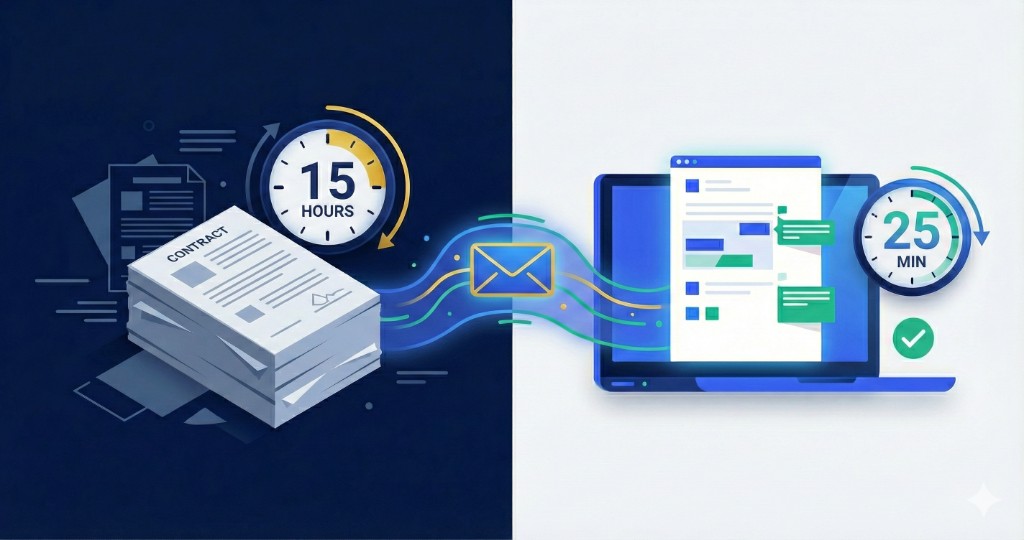
Stock Purchase Agreements are among the most complex transactional documents in commercial law. A typical SPA runs 40 to 80 pages and includes representations and warranties, indemnification clauses, closing conditions, and dozens of defined terms that need to be cross-referenced. Actual first-pass mark-up drafting time varies by deal size and complexity, but legal teams often budget at least 15 hours to prepare a first-pass mark-up draft of a Stock Purchase Agreement. That time goes to reading every clause, comparing terms against preferred positions, drafting redline language, and writing comments explaining each change.
For busy transactional teams, this can create timeline pressure. Teams need draft language quickly while preserving attorney oversight on strategy, risk tolerance, and final negotiation positions.
The Solution: Email the Contract to UseJunior
UseJunior is an AI-powered legal document drafting and analysis system that works entirely through email. There is no software to install, no portal to log into, and no new workflow to learn.
Here is the anonymized workflow from one M&A team:
Step 1: Forward the Document
The team emailed the SPA to UseJunior with a one-line instruction: "Review against our M&A playbook."
That playbook — previously uploaded — contains standard negotiating positions for SPAs: preferred indemnification caps, representations they usually request, closing conditions they typically negotiate, and other position preferences.
Step 2: AI Compares Against the Playbook
UseJunior parsed the SPA and compared each provision against the playbook's criteria. Where the document deviated from preferred terms, the system generated specific draft edits for attorney review — not generic flags, but proposed redline language.
The AI identified:
- Non-standard indemnification baskets — where the seller's exposure thresholds didn't match the firm's typical positions
- Missing representations — standard reps the playbook expects but the draft omitted
- Overly broad closing conditions — provisions that gave the counterparty more discretion than the firm typically accepts
- Defined term inconsistencies — places where terms were used but not defined, or defined but not used
Step 3: Receive the Initial Draft
Twenty-five minutes after the email was sent, a Word document with tracked changes arrived back in the team's inbox.
The document included:
- Insertions (in tracked changes) for suggested new language
- Deletions (in tracked changes) for provisions to remove or replace
- Margin comments explaining the rationale for each change, referencing the specific playbook criterion
The output format matched standard legal workflow: a .docx file with track changes that attorneys can review, edit, and approve.
Step 4: Attorney Reviews, Revises, and Sends
A supervising attorney opened the Word document, reviewed each tracked change, and made judgment calls. Some changes were accepted as-is. Others were modified based on the specific deal context. A few were rejected because the negotiation dynamics called for a different approach.
The Results: Initial Draft Prepared in 25 Minutes
| Metric | Before UseJunior | With UseJunior |
|---|---|---|
| Time to receive attorney-review-ready initial draft | 15+ hours | 25 minutes |
| Software installation required | N/A | None |
UseJunior returned an initial first-pass mark-up draft in 25 minutes. A supervising attorney then reviewed, revised, and approved the mark-up before it was sent to the counterparty.
This is an observed workflow example from one anonymized SPA process.
Scope and Limitations
- This case reflects one anonymized M&A workflow and is not a guarantee of future timing.
- Timing varies by document length, playbook quality, attorney review cadence, and transaction complexity.
- All AI-generated edits are draft suggestions and require attorney review, revision, and approval.
Why This Matters
For Attorneys and Associates
UseJunior can provide an organized first draft so attorneys can focus earlier on strategy, risk allocation, and negotiation priorities. The supervising attorney remains responsible for all substantive decisions and final redline language.
For Partners and Firm Leadership
Earlier first-pass drafts can improve client responsiveness, increase drafting consistency, and reduce late-night drafting pressure. The process is designed to support attorney-led workflows, not bypass them.
For Clients
Clients measure responsiveness and clarity. Faster attorney-reviewed first drafts can help teams communicate earlier, align expectations, and keep transactions moving.
How UseJunior Works: The Technical Details
UseJunior processes documents through a pipeline that combines large language model analysis with structured playbook comparison:
-
Document parsing: The system extracts the full text and structure of the uploaded document, identifying sections, defined terms, and cross-references.
-
Playbook matching: Each provision is compared against the relevant playbook criteria. The playbook is a structured set of the firm's negotiating positions, organized by clause type.
-
Edit generation: Where the document deviates from playbook positions, the system generates specific tracked-change edits — not summaries or flags, but actual replacement language.
-
Comment generation: Each edit includes a margin comment explaining why the change was suggested and which playbook criterion it addresses.
-
Output formatting: The result is packaged as a standard .docx file with tracked changes enabled, ready to open in Microsoft Word.
The entire process runs on infrastructure that is SOC 2 Type II and ISO 27001:2022 certified. Documents are encrypted in transit and at rest, and client data is never used for model training.
Common Questions About This Case Study
How long does it take UseJunior to prepare an initial SPA mark-up draft? In this case study, UseJunior prepared an initial first-pass mark-up draft in 25 minutes. Timing varies by document complexity, playbook quality, and attorney review workflow. Attorney review and approval happened after the draft was generated.
What format does UseJunior return the markup in? UseJunior returns a Microsoft Word document with tracked changes — the same format attorneys already use for redlines. The document includes insertions, deletions, and margin comments explaining each suggested edit for attorney review.
Does the attorney still need to review the AI markup? Yes. UseJunior generates a first-pass mark-up draft that the attorney then reviews, revises, accepts, or rejects. All external use should be attorney-approved.
How does UseJunior handle confidential documents? UseJunior is SOC 2 Type II and ISO 27001:2022 certified. Documents are encrypted in transit and at rest. Client data is never used for model training. See the Security Overview for details.
Do I need to install any software to use UseJunior? No. UseJunior works entirely via email. You forward a document, and the marked-up version is returned to your inbox. There is no portal, browser extension, or desktop application to install.
What types of contracts can UseJunior review? UseJunior handles a range of commercial agreements including Stock Purchase Agreements, NDAs, service agreements, leases, and construction contracts. The system uses customizable playbooks that can be tailored to your firm's or company's standards.
Try It on Your Contracts
This case study demonstrates what UseJunior can do with a Stock Purchase Agreement, but the same workflow applies to NDAs, service agreements, leases, and other commercial contracts.
If you want to see how UseJunior handles your documents:
- Email: steven@usejunior.com
- Book a demo: Schedule a 30-minute call
We can run a test with your playbook and a sample contract so you can evaluate the output on your own terms.
About Steven Obiajulu
Steven Obiajulu
Steven Obiajulu is a former Ropes & Gray attorney with deep expertise in law and technology. Harvard Law '18 and MIT '13 graduate combining technical engineering background with legal practice to build accessible AI solutions for transactional lawyers.
UseJunior is a tool for law firms and licensed attorneys. We do not provide legal advice.
At a Glance
- Document Type
- Stock Purchase Agreement (SPA)
- Typical first-pass mark-up prep time
- At least 15 hours (varies by draft quality and deal complexity)
- UseJunior initial mark-up draft prep time
- 25 minutes
- Final sign-off
- Attorney review and approval required
- Output Format
- Word document with track changes
- Workflow
- Email-based (no portal or software)
- Security
- SOC 2 Type II & ISO 27001:2022
Enterprise Security
SOC 2 Type II & ISO 27001:2022 certified. Your data is never used for training.
View Security Details →Ready to See This on Your Contracts?
Send us a document and see how UseJunior handles it. No software to install — just email.